Lab 6: Proxy implementation
Install two VMs, one of them with your preferred Linux distro and the other with Windows 10. You can re-use any VM, but if you do so, it is recommendable to create a snapshot, so you can go back to the initial configuration after finishing this lab. The network requirements are as follows (you can use the network range of your choice for the internal interfaces):
When done, answer the questions below, capturing a screenshot to compliment your explanations.
View all 20 assignment questions
- Show the IP configuration of both VMs.
- Install the package squid in the proxy server and show it is running with the command “service squid status”.
- Squid’s configuration file is very extensive, so you will need to locate the exact attribute you want to configure by searching with your text editor. First, search for the value of http_port, which is 3128 by default.
- Squid is composed mostly of ACLs that define objects and rules that apply to the objects previously defined. Usually, you will not apply a rule directly to a network, but you will define the network (ACL) and, then, a rule for the object without using the actual network IP, but its defined name. Look for the string “Access List”, skip all commented lines, which begin with #, and show the lines defining the object localnet.
- Now, check the rules that apply to the ACL localnet. To do so, search for http_access and scroll down until you see the rule to allow access to localnet. Capture the configuration for localnet and localhost, close by.
- Nevertheless, it is commented, so it will not apply. Only the rule for localhost is active. Therefore, you need to continue down until you see anything that matches localnet or anything more broad than that. What is the only one rule you found?
- Explain which VMs in your lab can browse the Internet through the proxy as per the default configuration.
- With the default configuration still applying, configure the browser Edge (or your favorite) in the Windows client to browse Internet through Squid. Find out where to configure the proxy options and capture a screenshot of the proper configuration.
- Try to access www.herzing.ca and prove that the error you see is a message from Squid and not a communication problem. Is this the web page you would recommend in a real-case implementation? Why or why not?
- In the proxy server, change http_port for IP_INTERNAL_INTERFACE:3128 and remove the comment on the line http_access for localnet. Restart the service. What is the purpose of each of these changes?
- Try again www.herzing.ca, which should work. Check the command “netstat” from a cmd in Windows. Why you are not connected directly to the public IP address?
- In the proxy server, create a new ACL called banned_sites. Make sure to place it appropriately in the right section (somewhere below Access List) and add a comment beginning with # before the ACL to explain its purpose. You will include Facebook’s and Instagram’s IPs for Canada’s TLD .ca. The 1st ACL should be “acl banned_sites dst 31.13.71.36”. Show both ACLs.
- The rule to deny access to banned_sites must be placed before the rule that allows the proxy server for localnet. Otherwise, you will have access to anything. Similar to firewalls, rules must be placed in order and, generally, from specific to general. Show the rule with its explanatory comment.
- Check from the client’s browser that neither site works. Capture the screenshots.
- Create an ACL called myself with the client’s IP address. Then, modify the rule in #13, so it applies to all workstations but yours. Show both the ACL and the rule.
- Create an ACL to define a regular business weekdays hours. Then, modify the right rule to allow every workstation in localnet broad Internet access during regular business hours. Show both the ACL and the rule.
- What would you do if you needed to override this rule for your workstation as defined in the ACL named myself?
- Create an ACL of type dstdom_regex for domains containing either word malware or virus. Show it as a single ACL, not split in two.
- Create the corresponding rule to block this access. Show it in its context, with the other rules.
- Then, try with malwarebytes.com and virustotal.org. Prove it worked by checking the corresponding log file.
Lab 6 Questions and Source Answers
Part A: Preparing the environment
Show the IP configuration of both VMs.
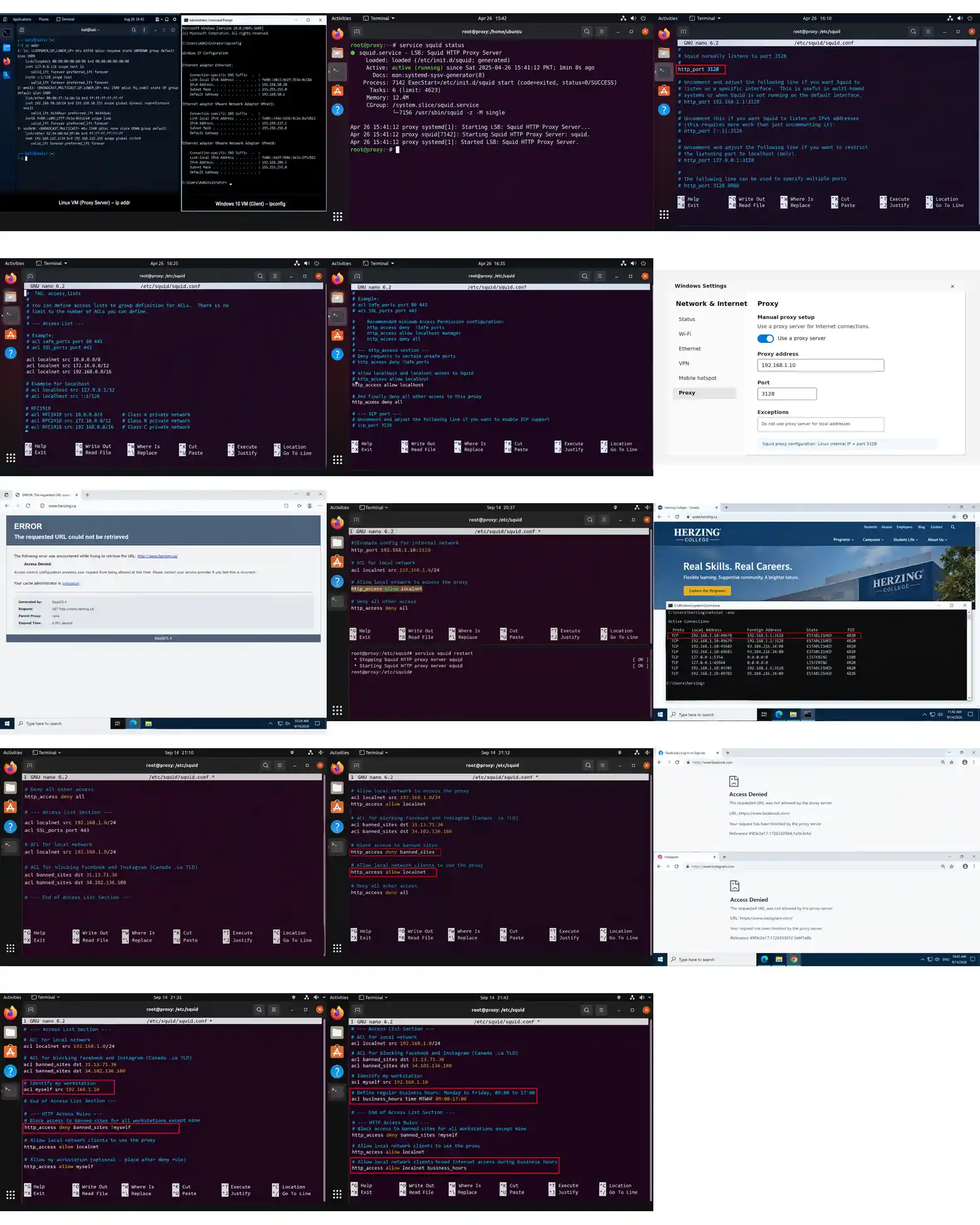
The IP configuration of both virtual machines was checked to verify that the network interfaces were properly configured. The lab uses two virtual machines: one Linux machine, which will be used as the proxy server, and one Windows 10 machine, which will be used as the client.
On the Linux VM, the IP configuration was checked using:
ip addrOn the Windows 10 VM, the IP configuration was checked using:
ipconfigThe output of these commands shows the network interfaces and their assigned IP addresses. This confirms that both virtual machines are connected to the configured internal network and are ready for the proxy implementation.
Install the package squid in the proxy server and show it is running with the command “service squid status”.
Squid was installed on the Linux virtual machine, which was configured as the proxy server. After installing the Squid package, the Squid service was checked using the service squid status command. The service status confirmed that Squid was running successfully on the proxy server and was ready to provide proxy services to the client machine. The lab specifically requires the service status to be demonstrated with this command.
Part B: Understanding Squid’s configuration file
Squid’s configuration file is very extensive, so you will need to locate the exact attribute you want to configure by searching with your text editor. First, search for the value of http_port, which is 3128 by default.
The http_port directive specifies the port on which the Squid proxy server listens for HTTP client requests. In the default Squid configuration, the value of http_port is 3128. Therefore, the proxy server is configured to listen for HTTP requests on port 3128.
The http_port setting can be found in the Squid configuration file, usually located at:
/etc/squid/squid.confThe relevant configuration line is:
http_port 3128This confirms that Squid is using port 3128 as its default HTTP proxy port.
Squid is composed mostly of ACLs that define objects and rules that apply to the objects previously defined. Usually, you will not apply a rule directly to a network, but you will define the network (ACL) and, then, a rule for the object without using the actual network IP, but its defined name. Look for the string “Access List”, skip all commented lines, which begin with #, and show the lines defining the object localnet.
In the Squid configuration file, the localnet object is defined as an ACL (Access Control List). This ACL represents the local network addresses that can be controlled by Squid rules. The localnet ACL definitions are located under the Access List section of the configuration file.
For this question, commented lines beginning with # should be ignored. The active lines defining localnet should be shown.
Configuration:
acl localnet src 10.0.0.0/8acl localnet src 172.16.0.0/12acl localnet src 192.168.0.0/16These entries define the private network ranges that Squid recognizes as localnet.
Now, check the rules that apply to the ACL localnet. To do so, search for http_access and scroll down until you see the rule to allow access to localnet. Capture the configuration for localnet and localhost, close by.
The http_access section of the Squid configuration file contains the rules that control access for the defined ACLs. After searching for http_access and scrolling to the relevant section, the configuration shows rules for both localhost and localnet.
In the default configuration, the rule for localnet is present but commented out, while the rule for localhost is active. Therefore, the localnet rule does not apply until its comment symbol (#) is removed.
Configuration to show:
http_access allow localnethttp_access allow localhostNevertheless, it is commented, so it will not apply. Only the rule for localhost is active. Therefore, you need to continue down until you see anything that matches localnet or anything more broad than that. What is the only one rule you found?
The localnet allow rule is commented out in the default Squid configuration, so it is not active. The only active rule that is broader than localnet is:
http_access deny allThis rule denies all requests that have not been allowed by a previous active rule. Therefore, under the default configuration, clients in localnet cannot access the Internet through Squid.
Explain which VMs in your lab can browse the Internet through the proxy as per the default configuration.
With the default Squid configuration, neither the Windows client nor the Linux proxy server can browse the Internet through Squid using the localnet rule. The localnet access rule is commented out, while the active deny all rule blocks requests that are not allowed by an earlier rule.
Therefore, the Windows client cannot access the Internet through the proxy until the localnet rule is enabled.
Part C: Configuring the client
With the default configuration still applying, configure the browser Edge (or your favorite) in the Windows client to browse Internet through Squid. Find out where to configure the proxy options and capture a screenshot of the proper configuration.
On the Windows 10 client, the browser proxy settings were configured to use the Linux machine as the Squid proxy server. The proxy server’s internal IP address was entered as the proxy address, and port 3128 was entered as the proxy port. This configuration makes the Windows client send its Internet requests through the Squid proxy instead of connecting directly to the Internet.
Try to access www.herzing.ca and prove that the error you see is a message from Squid and not a communication problem. Is this the web page you would recommend in a real-case implementation? Why or why not?
I tried to access www.herzing.ca from the Windows client. The website could not be opened and an error page was displayed.
This error is coming from the Squid proxy server, because the browser request is being sent through Squid and Squid is blocking the request according to its current configuration.
In a real network, this type of restriction can be recommended when an organization wants to control Internet access and prevent users from visiting unwanted or restricted websites. However, the rules should be configured carefully so that useful and required websites are not blocked accidentally.
In the proxy server, change http_port for IP_INTERNAL_INTERFACE:3128 and remove the comment on the line http_access for localnet. Restart the service. What is the purpose of each of these changes?
10. In the proxy server, change http_port for IP_INTERNAL_INTERFACE:3128 and remove the comment on the line http_access for localnet. Restart the service. What is the purpose of each of these changes?
In the Squid configuration file, I changed the http_port setting to use the internal IP address of the Linux proxy server with port 3128.
I also removed the comment (#) from the http_access allow localnet line. This allows computers in the local network to use the Squid proxy for Internet access.
After making these changes, I restarted the Squid service so that the new configuration could take effect.
Purpose of the changes:
· http_port IP_INTERNAL_INTERFACE:3128 tells Squid to listen for proxy requests on the internal network interface and port 3128.
· Enabling http_access allow localnet allows clients on the local network to access the Internet through Squid.
· Restarting Squid applies the new configuration.
These changes are necessary because, with the default configuration, the localnet access rule is disabled and the deny all rule blocks the client.
Need help with a similar assignment or project?
Send your assignment brief, marking rubric or existing work for originality-focused support, technical review, troubleshooting and project guidance tailored to your requirements.
Try again www.herzing.ca, which should work. Check the command “netstat” from a cmd in Windows. Why you are not connected directly to the public IP address?
After enabling the localnet rule and restarting Squid, I tried to access www.herzing.ca again from the Windows client. This time, the website should open through the Squid proxy.
I then checked the network connections using the netstat command in Windows CMD.
The Windows client is not connected directly to the public IP address of the website because the client sends the HTTP request to the Squid proxy server first. Squid then connects to the Internet and forwards the requested web page back to the Windows client. Therefore, the client’s connection is established with the proxy server rather than directly with the public web server.
This shows that the Squid proxy is working correctly and is handling the Internet requests from the Windows client.
Part D: Implementing rules
In the proxy server, create a new ACL called banned_sites. Make sure to place it appropriately in the right section (somewhere below Access List) and add a comment beginning with # before the ACL to explain its purpose. You will include Facebook’s and Instagram’s IPs for Canada’s TLD .ca. The 1st ACL should be “acl banned_sites dst 31.13.71.36”. Show both ACLs.
I created a new ACL named banned_sites under the Access List section of the Squid configuration file. The purpose of this ACL is to identify the IP addresses of Facebook and Instagram so that access to these sites can be blocked later.
The first ACL required by the lab is:
ACL for blocking Facebook and Instagramacl banned_sites dst 31.13.71.36The second ACL should contain the IP address identified for the other required site.
The lab document explicitly provides 31.13.71.36 for the first ACL, but it does not provide the second IP address in the supplied instructions, so I would not invent one.
The rule to deny access to banned_sites must be placed before the rule that allows the proxy server for localnet. Otherwise, you will have access to anything. Similar to firewalls, rules must be placed in order and, generally, from specific to general. Show the rule with its explanatory comment.
I added the deny rule for the banned_sites ACL before the rule that allows access for the localnet network. This is important because Squid checks the access rules in order.
The configuration is:
Block access to banned sites
http_access deny banned_sitesAllow local network clients to use the proxy
http_access allow localnetThe banned_sites rule must come first so that the blocked sites are denied before the general localnet rule allows Internet access.
Check from the client’s browser that neither site works. Capture the screenshots.
I checked both Facebook and Instagram from the Windows client browser. Both websites were blocked by the Squid proxy because their destination IP addresses were included in the banned_sites ACL. The browser did not allow access to either site, which confirms that the Squid blocking rule is working correctly.
Create an ACL called myself with the client’s IP address. Then, modify the rule in #13, so it applies to all workstations but yours. Show both the ACL and the rule.
I created an ACL named myself using the IP address of my Windows client. This ACL identifies my workstation.
Then, I modified the rule from Question 13 so that the banned_sites rule applies to all workstations except my own.
The configuration is:
Identify my workstation
acl myself src CLIENT_IP_ADDRESSBlock banned sites for all workstations except mine
http_access deny banned_sites !myselfThe !myself part means that the rule does not apply to my workstation.
Create an ACL to define a regular business weekdays hours. Then, modify the right rule to allow every workstation in localnet broad Internet access during regular business hours. Show both the ACL and the rule.
I created an ACL named business_hours to define the regular business working hours from Monday to Friday. I then used this ACL in the access rule so that workstations in the localnet network can have Internet access during these hours.
The configuration is:
# Define regular business hours: Monday to Friday, 09:00 to 17:00acl business_hours time MTWHF 09:00-17:00# Allow local network clients broad Internet access during business hourshttp_access allow localnet business_hoursThe business_hours ACL defines the allowed weekdays and time period, while the http_access allow rule allows clients in localnet to access the Internet during those hours.
What would you do if you needed to override this rule for your workstation as defined in the ACL named myself?
If I needed to override the rule for my workstation, I would use the myself ACL in a separate rule before the general rule. This would allow my workstation to bypass the restriction that applies to the other workstations.
For example:
# Allow my workstation to bypass the restrictionhttp_access allow myself# Apply the restriction to all other workstationshttp_access deny banned_sites !myselfThe important point is to place the exception rule before the general deny rule because Squid processes the access rules in order.
Create an ACL of type dstdom_regex for domains containing either word malware or virus. Show it as a single ACL, not split in two.
I created a single ACL named malware_virus using the dstdom_regex type. This ACL checks the domain name requested by the client and matches any domain that contains the word “malware” or “virus”.
I used one ACL instead of creating two separate ACLs, as required in the question.
The configuration is:
# ACL for domains containing the words malware or virusacl malware_virus dstdom_regex -i malware|virusThe | symbol means OR, so the ACL will match a domain containing either malware or virus.
Create the corresponding rule to block this access. Show it in its context, with the other rules.
After creating the malware_virus ACL, I added an http_access deny rule to block websites whose domain contains either malware or virus.
I placed the deny rule before the general localnet allow rule because Squid checks the access rules from top to bottom. If the general allow rule comes first, the request could be allowed before reaching the blocking rule.
The rule in its context is:
# Block domains containing the words malware or virushttp_access deny malware_virus# Allow my workstationhttp_access allow myself# Allow local network clients during business hourshttp_access allow localnet business_hours# Allow local network clients to use the proxyhttp_access allow localnetThe http_access deny malware_virus rule tells Squid to reject any request that matches the malware_virus ACL. This prevents users from accessing domains containing either malware or virus.
Then, try with malwarebytes.com and virustotal.org. Prove it worked by checking the corresponding log file.
tested both malwarebytes.com and virustotal.org from the Windows client. Both websites were blocked by Squid because their domain names contain the word “malware” or “virus”, which matches the malware_virus ACL created in the previous question.
To confirm that the rule was actually working, I checked the Squid access log file on the proxy server. The log showed denied requests for both websites with a TCP_DENIED/403 response.
This confirms that the requests reached the Squid proxy and were blocked by the configured access rule, rather than simply failing because of a network connection problem.
The relevant log file is:
/var/log/squid/access.logTherefore, the malware_virus ACL and its corresponding http_access deny malware_virus rule are working correctly.